Phase Two · Plugin 3 of 3
UngodlyGFX v1.0.0
A single BepInEx plugin that takes near-total control of Easy Red 2's rendering and HUD and pushes every dial far past what the vanilla Settings menu allows — while staying multiplayer-legal and cooperating perfectly with the game's own settings system. Vanilla gives you a plain shadows ON/OFF switch, render scale capped at 100%, no TAA, fixed AO strength, preset-locked god rays, a fixed HUD and a 240 frame cap. UngodlyGFX replaces all of that with 106 fully-documented settings across 10 categories, applied live, no restarts.
Headline upgrades the vanilla menu simply cannot do
- True supersampling — render scale up to 200%: downsamples more pixels than your monitor has and melts shimmer off distant fences, foliage and wires.
- Full shadow pipeline — distance, cascade count, cascade fade, separate sun/other-light shadow-map resolutions up to 4096, light-count caps.
- TAA and quality-tiered SMAA post anti-aliasing on top of hardware MSAA.
- Complete URP post-FX suite — bloom, color grade, white balance, ACES tonemapping, vignette, motion blur, film grain, chromatic aberration, lens distortion — each with a Vanilla / Off / Custom tri-state.
- Boosted god rays (OccaSoftware LSPP) — density, sample quality and reach far beyond preset limits — plus an ambient-occlusion boost that retunes whichever AO method (SSAO or GTAO) the vanilla menu selected.
- Extended world detail — LOD distance, grass/furniture density above vanilla max, tessellation, stochastic tiling, HD sky/grass, cloud quality, ragdoll limit.
- HUD scale + opacity, one-stop access to the game's own crosshair / hit-marker / UI-declutter toggles, an unlimited frame rate option, a proper V-Sync tri-state, and a built-in performance overlay (fps, frame-time, average, 1% lows, live render scale) so you can see what every slider costs.
Requirements
- Easy Red 2 v2.0.6 (works with all DLC installed).
- BepInEx 6 Bleeding Edge — IL2CPP, win-x64 (build 785 or newer). This mod requires the IL2CPP BepInEx 6 line — not BepInEx 5 and not the Mono build. Full walkthrough on the BepInEx page.
Install
Field Order 01Open the mod archive
Grab UngodlyGFX_v1_0_0_StixsworldHD.rar from the
Downloads page:
UngodlyGFX_v1_0_0_StixsworldHD.rar
|- StixsworldHD.EasyRed2.UngodlyGFX.dll     <- the entire mod
'- README.md <- full manual & 106-setting referenceField Order 02Drop the DLL into plugins
Copy the DLL into your game's plugins folder so it lands at:
Easy Red 2\BepInEx\plugins\StixsworldHD.EasyRed2.UngodlyGFX.dllFolder layout after install, with the optional companions alongside:
Easy Red 2\
|- Easy Red 2.exe
|- winhttp.dll
|- doorstop_config.ini
'- BepInEx\
   |- core\            (BepInEx itself)
   '- plugins\
      |- StixsworldHD.EasyRed2.UngodlyGFX.dll          <- this mod
      |- StixsworldHD.EasyRed2.UngodlyAI.dll           <- optional companion
      '- StixsworldHD.EasyRed2.UngodlyBallistics.dll   <- optional companion
Field Order 03Launch, press F8, tune
- Launch the game. In-game, press F8 to open the UngodlyGFX configuration window.
- To verify from the log instead:
BepInEx\LogOutput.logcontainsUngodlyGFX … is liveon a healthy load. - First launch writes
BepInEx\config\com.stixsworldhd.easyred2.ungodlygfx.cfg(~40 KB, 10 sections, every setting with its explanation, type, default and range as comments).
That's it. Everything applies live — tune freely, no restarts.
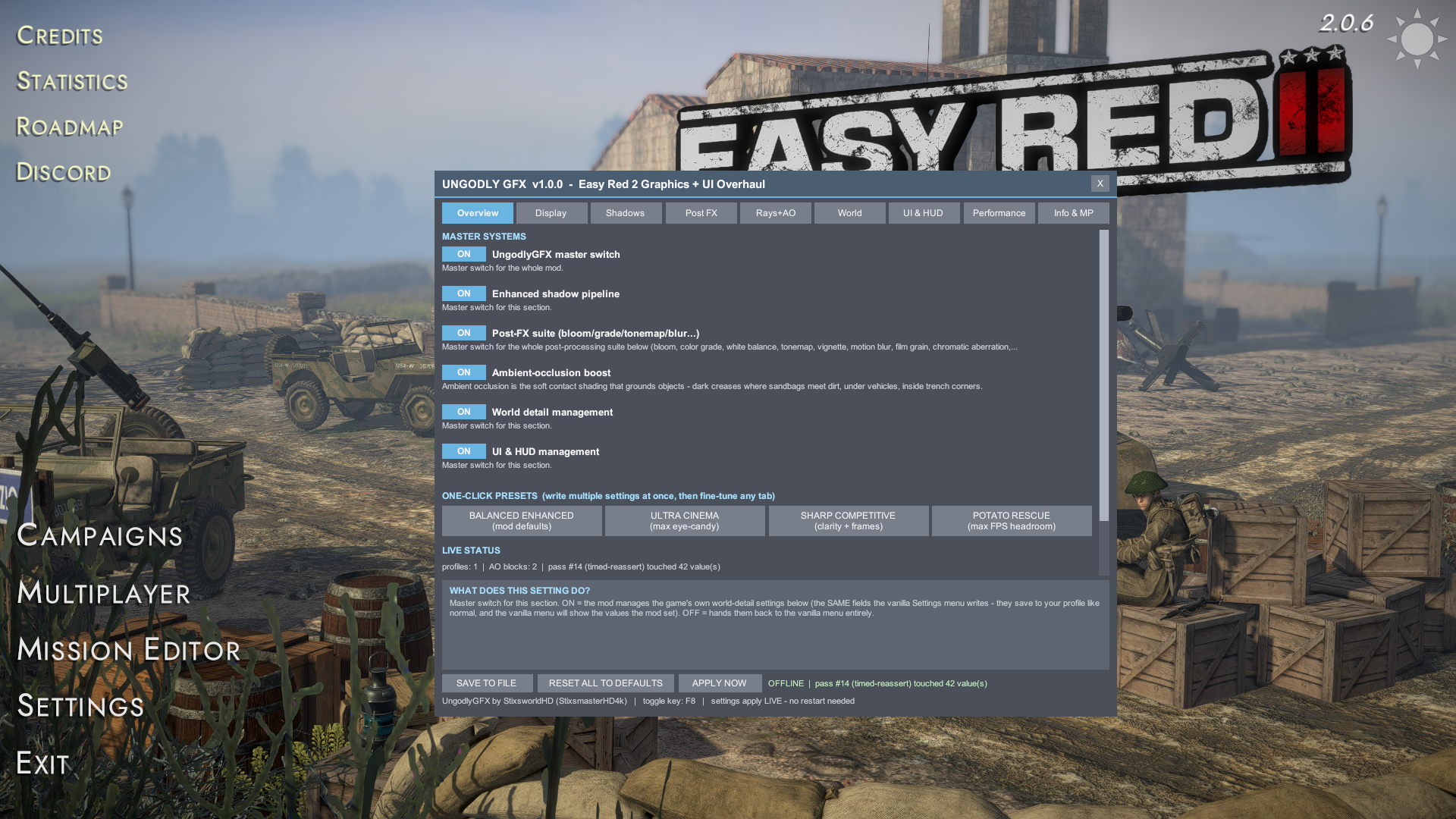
The in-game window (F8, rebindable)
Nine tabs: Overview / Display / Shadows / Post FX / Rays+AO / World / UI & HUD / Performance / Info & MP. Every setting shows its own explanation in the panel at the bottom when you hover it — what it does, what raising or lowering changes on screen and in your framerate, and its allowed range. Footer buttons: Save to file, Reset all to defaults, Apply now. Drag the title bar to move the window; the toggle key is rebindable on the Info & MP tab.
One-click presets
- BALANCED ENHANCED (mod defaults) — a clear all-round upgrade any mid-range GPU can run: SMAA High, ACES tonemap, enhanced 180 m shadows, boosted AO, LSPP rays, richer world detail.
- ULTRA CINEMA — screenshots & cinematic co-op: 130% supersampling, TAA, 300 m shadows @ 4096, punchy ACES grade, thick 96-sample god rays, AO 3.0, LOD 4.5, 96 ragdolls, DOF + SSR on.
- SHARP COMPETITIVE — clarity + frames: strips every clarity-eating effect (blur, grain, fringing, vignette, DOF, rays), locks SMAA + MSAA×4, Neutral tonemap, Unlimited FPS, V-Sync off, HUD 0.9, enhanced shadows/AO kept.
- POTATO RESCUE — max FPS headroom: 75% + FSR sharpening, FXAA, 90 m / 2-cascade / 1024 shadows, no rays, half-res AO, trimmed world detail, 12 ragdolls, faster debris cleanup.
Presets only set values — nothing is locked. Load one, then fine-tune any tab.
Multiplayer safety (why this can't desync a lobby)
Easy Red 2 replicates game state over Photon PUN — transforms, health,
ammo, capture progress, chat. It never replicates render state. Everything
UngodlyGFX touches is GPU-side / screen-side and exists only on your machine: the URP pipeline
asset, URP Volume post-processing, SSAO/GTAO renderer-feature settings,
QualitySettings, the main camera, the HUD canvas.
The vanilla passthroughs (grass density, tessellation, clouds, ragdolls, DOF, SSR, FOV, HUD
toggles…) write the same SavableData.Settings fields
the game's own Settings menu writes and call the same Apply*
methods — if the vanilla menu is multiplayer-legal, these are too, by construction. The mod
contains zero Harmony patches on networking, simulation, damage, movement or
AI code; its only patches are read-only postfixes on the game's graphics
Apply* methods, used purely as “vanilla just re-applied —
re-assert my values next frame” signals.
Fairness by design: deliberately not included — fog/weather-density edits, darkness/night-brightness cheats, enemy-outline / ESP-style rendering, and FOV beyond a sane 50–130.
Performance notes
- Render scale is the biggest single cost — GPU load scales roughly with its square (141% ≈ 2× native, 200% ≈ 4×). Below 100%, pair it with the FSR upscaler.
- Shadow distance × resolution × cascades is the second-biggest budget; drop distance first if you need frames.
- God-ray samples and AO samples are the quality/FPS knobs of their effects.
- Steady-state overhead of the mod itself is negligible — every apply pass diff-checks and skips writes when a value already matches. Watch the 1% lows on the performance overlay while you tune; that's the number that predicts how a battle feels.
Disable / uninstall
- Flip UngodlyGFX master switch off in the Overview tab for an instant hand-back to vanilla rendering.
- Full removal: delete
BepInEx\plugins\StixsworldHD.EasyRed2.UngodlyGFX.dll. Delete the.cfgto regenerate defaults next launch.