Phase One · The Loader
Installing BepInEx 6 into Easy Red 2
BepInEx is the plugin loader every Ungodly mod stands on. Easy Red 2 is a Unity 6, IL2CPP, 64-bit game, which means you need one very specific flavor: BepInEx 6 Bleeding Edge — Unity.IL2CPP — win-x64. Not BepInEx 5. Not the Mono build. Not x86. This page gets exactly the right build into exactly the right folder, and proves it works before a single mod goes in.
Why this exact build? Easy Red 2 ships as IL2CPP — the C# game code is
compiled to native machine code (that 45 MB GameAssembly.dll in
the game folder). BepInEx 5 and the Mono builds hook the Mono runtime, which this game does not
have. Only the BepInEx 6 IL2CPP line can generate the interop assemblies that let
plugins like the Ungodly series talk to IL2CPP game code. The mods were built against Bleeding
Edge build 785; any recent BE build works.
Field Order 01Locate your game folder
Everything installs into the folder that contains Easy Red 2.exe.
The fastest way to open it:
- In Steam, right-click Easy Red 2 in your library.
- Choose Manage → Browse local files. An Explorer window opens directly in the game root.
Typical locations — yours depends on which drive your Steam library lives on:
C:\Program Files (x86)\Steam\steamapps\common\Easy Red 2\
F:\SteamLibrary\steamapps\common\Easy Red 2\        <- the reference install in the screenshots
Before touching anything, a clean unmodded root contains
Easy Red 2.exe, GameAssembly.dll,
UnityPlayer.dll, baselib.dll,
UnityCrashHandler64.exe and the
Easy Red 2_Data folder. If you see those, you are in the right place.
All DLC is supported and needs no special handling. Normandy,
Stalingrad, Ardennes, Iwo Jima & Bougainville, Kwajalein, Tinian, Guam, Anzio &
Nettuno, Sicilia, Fall of Berlin and the rest all load through the same
GameAssembly.dll — BepInEx and the Ungodly plugins hook the game
once, and every campaign benefits.
Field Order 02Download the correct BepInEx package
- Open the official Bleeding Edge build server: https://builds.bepinex.dev/projects/bepinex_be
- On the latest build, find the artifact list and download the one named exactly like this (the trailing number is the build — 785 or newer is what the Ungodly series was built and tested against):
BepInEx-Unity.IL2CPP-win-x64-6.0.0-be.785+af0cba7.zipThree parts of that name are load-bearing. Check all three before you download:
- Unity.IL2CPP — not Unity.Mono, not NET.Framework, not NET.CoreCLR.
- win-x64 — Easy Red 2 is a 64-bit Windows game; the x86 package will not attach.
- 6.0.0-be.### — the BepInEx 6 Bleeding Edge line. BepInEx 5.x cannot load IL2CPP plugins at all.
Windows sometimes flags freshly downloaded loader zips. If SmartScreen or your AV
quarantines winhttp.dll from inside the archive, restore it and add
an exclusion for the game folder — this proxy-DLL technique is how every BepInEx install on
Windows bootstraps itself, and the builds on the official server are the canonical ones.
Field Order 03Extract it directly into the game root
Open the downloaded zip and extract its entire contents straight into the game
folder from Step 01 — the same level as Easy Red 2.exe, not
into any subfolder. If Explorer asks to merge or overwrite, say yes.
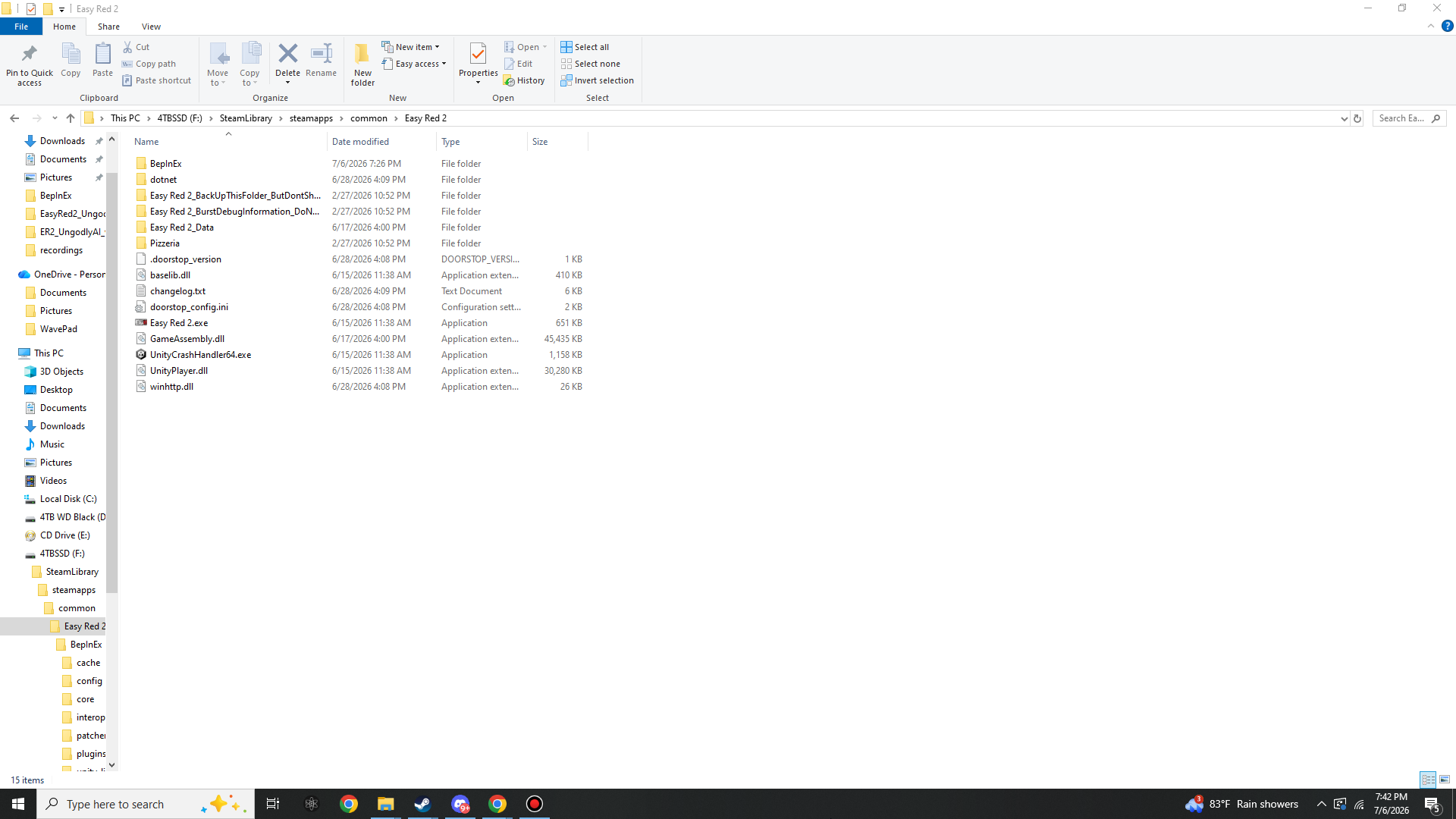
After extraction, the game root must contain all five of these new entries sitting next to the game exe:
Easy Red 2\
|- BepInEx\                  <- the loader itself (core\, patchers\, ...)
|- dotnet\                   <- bundled .NET runtime BepInEx 6 IL2CPP uses
|- .doorstop_version          <- version marker for the injector
|- doorstop_config.ini        <- tells the injector what to launch
|- winhttp.dll                <- the injector: Windows loads it with the game
|- changelog.txt              <- BepInEx changelog (harmless, ships in the zip)
|
|- Easy Red 2.exe             <- already there
|- GameAssembly.dll           <- already there
|- UnityPlayer.dll            <- already there
'- Easy Red 2_Data\           <- already there
This is the single most common failure point: if you end up with
Easy Red 2\BepInEx-Unity.IL2CPP-win-x64...\BepInEx\ — a folder inside
a folder — the game will launch completely vanilla. winhttp.dll must
sit in the same directory as Easy Red 2.exe, because Windows only
loads it from there.
Compare against the reference install — this is exactly what your root should look like
(screenshot taken after the first run in Step 04, so
BepInEx already shows a fresh modified date):
What these files actually do
No action needed — but it helps to know what you just installed.
winhttp.dll is UnityDoorstop: the game asks Windows for the
system WinHTTP library, Windows finds this one first, and it boots BepInEx before a single frame
renders. doorstop_config.ini points it at
BepInEx\core\BepInEx.Unity.IL2CPP.dll, and the
dotnet\ folder is the self-contained .NET runtime the IL2CPP loader
runs on. Delete winhttp.dll and the whole stack silently disarms —
which is also the official one-file uninstall.
Field Order 04Run the game once — the interop bake
Launch Easy Red 2 normally through Steam. The first modded launch takes several minutes longer than usual — this is the important part, not a hang:
- A BepInEx console window may appear alongside the game. Leave it alone.
- BepInEx reads
GameAssembly.dllplus the game's metadata and generates interop assemblies — managed mirrors of every game class, written toBepInEx\interop\. This is what lets plugins call IL2CPP code, and it only happens on this first run (and again after game updates). - Wait until the main menu fully loads, then quit the game.
During startup you may see
[Warning:Il2CppInterop] Class::Init signatures have been exhausted, using a substitute!
in the console or log. That line comes from the BepInEx/Il2CppInterop core resolving an
internal engine signature for this Unity version — it appears even with an empty plugins folder,
is expected on Bleeding Edge builds, and is harmless. It is not produced by any Ungodly plugin.
That single run creates the working folders every mod page on this site refers to:
Easy Red 2\BepInEx\
|- cache\           <- interop generation cache
|- config\          <- BepInEx.cfg now exists; every plugin writes its .cfg here
|- core\            <- BepInEx itself (shipped in the zip)
|- interop\         <- the generated game assemblies (the 'bake')
|- patchers\        <- (shipped, empty by default)
|- plugins\         <- THIS is where the Ungodly DLLs go
|- unity-libs\      <- downloaded Unity base libraries for this engine version
|- ErrorLog.log
'- LogOutput.log     <- your first stop for any verification or bug report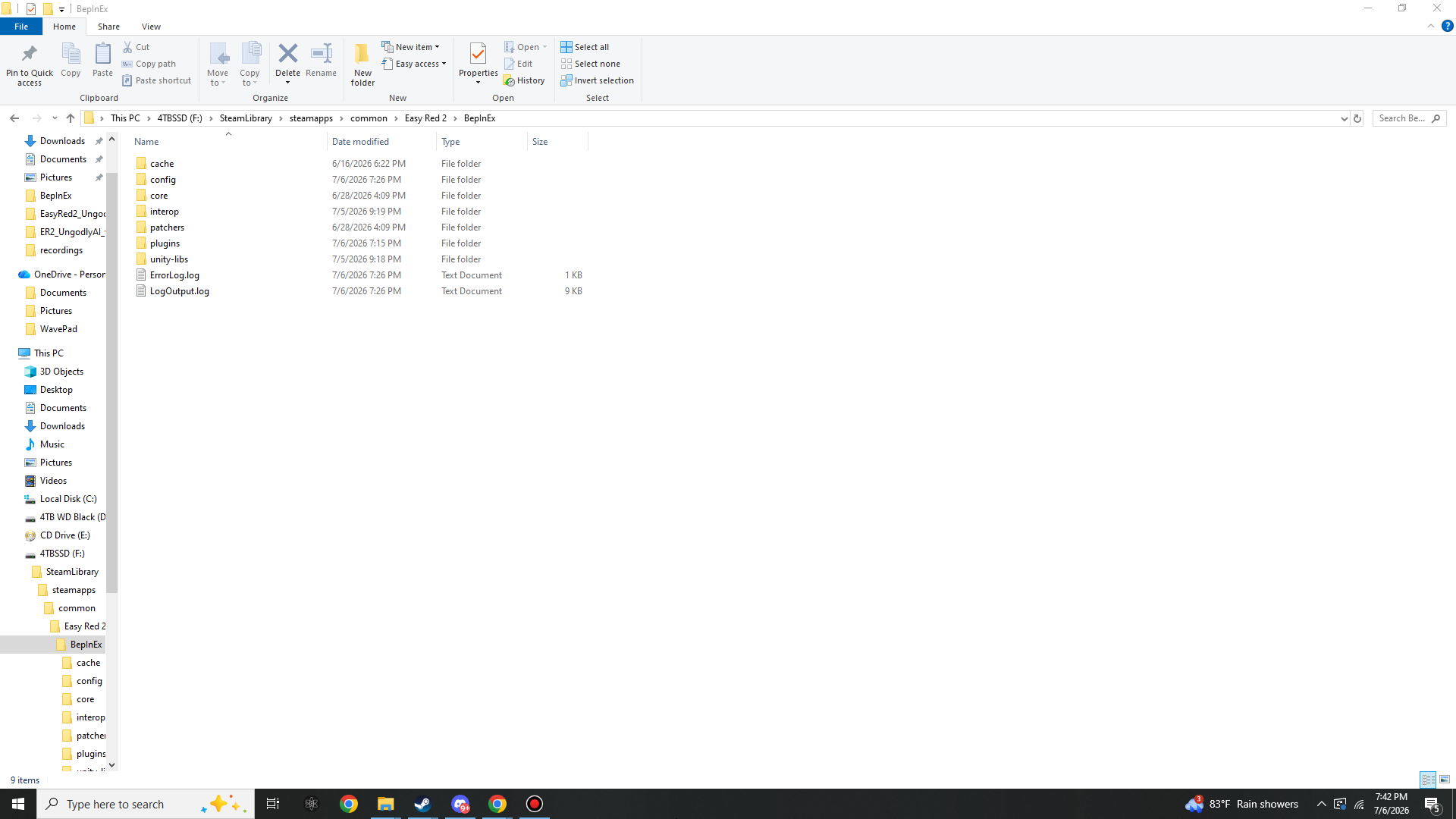
Field Order 05Confirm the loader is alive
Two quick checks, no tools required:
BepInEx\LogOutput.logexists and has a fresh timestamp. Open it in Notepad — the first lines identify the BepInEx version and the game. If the file is missing or stale, BepInEx never started: re-check Step 03 (files must sit next to the exe, x64 IL2CPP build, not Mono).BepInEx\interop\is full of DLLs. Assembly-CSharp.dll and friends prove the interop bake completed.BepInEx\plugins\andBepInEx\config\now exist and are ready for the mods.
The loader is in. From here, every mod is a quick drop:
UngodlyAI ·
UngodlyBallistics ·
UngodlyGFX ·
Killstreak Announcer. Install any combination — the
Ungodly trio shares zero Harmony targets and is built to run together, and the announcer is a
pure listener (one DLL plus its KSounds voice folder in the game
root).
Removing BepInEx later
Delete winhttp.dll from the game root and the game boots 100% vanilla
— the remaining folders are inert without the injector. For a full clean, also delete
BepInEx\, dotnet\,
.doorstop_version, doorstop_config.ini and
changelog.txt. Your Ungodly .cfg files live in
BepInEx\config\ — copy them out first if you want to keep your tuning.