Phase Two · Plugin 1 of 3
UngodlyAI v2.17.0
Vanilla Easy Red 2 runs exactly one soldier brain per rendered frame for the entire battlefield — on a 200-bot map, each bot re-evaluates once every ~3+ seconds. UngodlyAI multiplies the game's own scheduler under a hard CPU budget, then rebuilds what those brains actually do: strategy, squad orders, radios, kit, vaulting, and eyes that respect night, fog and smoke. Every hook was verified against the game's own v2.0.6 code via IL2CPP disassembly and interop reverse-engineering.
What it changes
- Thinking speed — bots think up to 16× more often, governed by
BrainFrameBudgetMs(default 1.5 ms/frame) with a Stopwatch hard-stop, so the mod can never spiral your frametime. The global pathfinder budget (vanilla: a hardcoded 3 ms shared by every unit) becomes configurable. - Dynamic route refresh — vanilla re-paths every 14–18 s no matter what. UngodlyAI runs a fast combat clock (default 1.5–3 s) while a bot has a target or is suppressed, and a moderate calm clock (6–10 s) otherwise.
- Stuck-bot rescue — fresh path first, then a short human-looking sidestep. No teleport crutches; the infamous multiplayer “bot blinked 20 m” teleport is blocked by default.
- Human combat feel — per-soldier hidden skill, first-contact surprise, first-shots-go-wide aim settling, leading error against sprinters, range falloff and real suppression, layered on a faithful reimplementation of the vanilla difficulty formula so your Difficulty sliders keep their exact meaning.
- Objective prioritization — replaces vanilla's nearest-objective conga armies and random-wandering defenders with a scored strategic brain: distance-weighted, crowd-balanced, contested points pull reinforcements, periodic re-evaluation.
- Squad command brain — coordinated charges onto contested points, garrison holds on fresh captures, automatic regroup of scattered survivors, context-aware formations — all through the game's own squad-order API with native network sync.
- Radio & fire support — verified: vanilla AI squads never call artillery. Now AI leaders with a living radioman genuinely use the radio: HE when pinned, smoke ahead of assaults, tank/AT support on spotted armor — the exact pipeline a human triggers, radioman confirmation and all.
- Kit & class intelligence — the wounded bandage themselves after a human fumble delay, AT units commit AT grenades on armor inside real range, pinned soldiers pop panic smoke, stationary gunners deploy bipods; medics get a treatment heartbeat, marksmen get patient trigger timing, radiomen stick to the leader.
- Map weapons crewing (v2.5.0) — verified in the disassembly: every emplaced gun on every map (sandbag MGs, AT guns, howitzers, AA mounts) is a stationary vehicle with a complete built-in turret-gunner AI that engages the moment anyone sits down — and vanilla never sends a single soldier to one. Now defending and garrisoning owned squads man nearby empty guns through the game's own walk-up-board-sync pipeline (the exact call its Lua scripting uses), spotted enemy armor triggers urgent AT-gun scrambles at +50% radius, a per-gun claim system stops squads racing one mount, the leader and support specialists (medics, radiomen, marksmen) are never pulled off their jobs, and vanilla's own dismount logic returns crews to the squad when it pushes on.
- Battlefield looting (v2.6.0) — the supply loop-closer. The mod taught AI to spend its kit like humans, but vanilla offers no way to ever restock — verified: every dead soldier keeps a fully valid inventory, and the game's own take-from-inventory transfer (with pickup animation) sits unused for AI. Now owned bots with a genuine need walk to a nearby fallen soldier and take exactly what they lack: a bleeding rifleman whose bandages ran dry takes a dressing and patches himself up on the spot, AT units who spent their charge restock and stay dangerous, missing smoke gets replaced (frag restock exists but ships off — it reads greedy). Loot runs start and abort on safety — no visible target, suppression under a ceiling, never mid-charge — time out after 14 s, and a per-corpse claim check at the moment of the take resolves two bots racing one body.
- Take cover & screening smoke (v2.7.0) — verified: vanilla has no code path where a leader reacts to his squad being mauled, and members receiving any cover or waypoint order can sit on a repath timer up to 18 seconds before their pathfinder even looks at the destination. Now owned AI leaders call a genuine "TAKE COVER!" when the squad takes sudden effective fire or loses a man — the squad scatters into surrounding cover through the game's own order, weathers the worst, then resumes with a fresh approach. Every destination order (cover / waypoint / charge) now lands instantly: the repath timer is zeroed the moment it arrives, which also snaps a human player's own command-wheel orders into motion. And squads screen their own maneuvers — an engaged carrier pops hand smoke on the threat axis when advancing under fire or scattering, and the occlusion system makes that cloud genuinely blind the AI shooting at them.
- Cover fighting (v2.8.0) — two facts from the disassembly: every cover point on every map carries a hand-authored firing pose and arc the AI never reads, and the CombatCover class appears exactly zero times in the vanilla AI brain — a covered bot just stands there firing until somebody dies. Now owned AI at cover fight like humans: rise into the mapper's intended pose, hold a skill-scaled fire window (deployed MGs hold much longer — they're the base of fire), drop behind cover for a suppression-scaled beat, rise again with a genuine re-acquisition penalty on every peek — and accurate return fire slams them down early mid-window. A braced-aim bonus applies while exposed, suppressive fire finally buys the attacker something tangible, and the vault system never abandons a working cover fight.
- Counterattack (v2.9.0) — verified: when the enemy takes an objective a faction held, vanilla does nothing special — defenders keep picking random objectives and any recapture is a statistical accident. Now losing a point is a detected event: the flip is caught within seconds, the freshly-lost objective spikes in every squad's task scoring with a bonus decaying across a configurable memory window, the nearest uncommitted squads are immediately re-tasked into a counterattack wave (per-objective cooldown; never drafting player squads, contested defenses, or depleted squads), and squads assaulting recently-lost ground push straight onto the point — hit them before they dig in, exactly like a human commander.
- Close quarters & melee (v2.10.0) — decoded from the disassembly: vanilla AI melee requires the attacker's own suppression above 20 plus a 34% random roll on the slow one-brain-per-frame tick — the strike is literally coded as a panic move, so two bots hose the walls around each other at two meters with bayonets forever sheathed. Now any owned bot with a visible enemy at blade range strikes reliably through the game's own synced melee (calm or panicked), charging bots get +30% commit reach so bayonet charges finally end in bayonet strikes — over the sandbags and into the trench, blades first — trigger delays inside CQB range run on adrenaline (snap factor plus a halved surprise window), and a hard aim-error ceiling inside 8 m means a man-sized target at point blank is treated like one, whatever smoke, suppression or panic says.
- Smoke doctrine (v2.11.0) — real infantry burn smoke
constantly: before crossings, over casualties, on the point — and until now every
hand-smoke behavior here was tuned conservatively. One global dial
(
SmokeDoctrine, default 1.6× the old rhythm) now drives how often all hand smoke flies, plus three new human occasions: pre-emptive crossing smoke — a squad advancing with fresh contact but not yet suppressed screens before the crossing turns into a bloodbath (smoke first, bleed later); screening continues inside contested objectives while the fight for the point rages; and when the medic is dispatched, an engaged carrier screens the casualty area, covering the corpsman's run. The looting system keeps carriers restocked from the fallen so high doctrine stays sustainable all battle, and the occlusion system makes every one of these clouds genuinely blind the AI firing through them. - Critical fixes (v2.11.1 → v2.11.2) — two hunts that ended at
the mod's oldest assumption. v2.11.1 fixed smoke starvation: every hand-thrown item
shared one 18-second per-bot grenade clock that combat keeps permanently hot, so no smoke
setting could ever matter — tactical smoke now rides a dedicated per-bot lane, commanded
throws go through a handshake that pre-flights the engine's own animation gate, and cooldowns
arm only on an accepted throw. v2.11.2 then found the deeper truth in a full
reference census of the decompile:
VirtualSmokeGrenadeandVirtualATGrenadeare orphaned classes — nothing in the entire game ever constructs them; a throwable's real identity lives in its authored prefab'sgrenadeTypedata. Every type-cast since v2.1.0 had silently returned null, leaving panic smoke, screening smoke, smoke looting and the whole AT-grenade-vs-armor reflex structurally dead. A data-truth classifier now reads the prefab's grenadeType once per item id and caches it — resurrecting the complete smoke doctrine and anti-armor reflex on the game's own item data for the first time. No new settings; if you're on v2.11.0 or older, this alone is the update. - Air combat (v2.12.0) — the disassembly shows the game ships a real flight
brain (bomb-run states, a dive system keyed to each aircraft's hand-authored dive angle,
dogfight fight-modes, air-target selection) with placid decisions and one glaring hole:
zero defensive logic — no plane in vanilla has ever evaded anything. Now
locally-piloted AI aircraft fly like they mean it: bomb-run dives run steeper
(
DiveSteepnessMulton the plane's authored angle, capped at 82°), pull-outs press 30% lower before release (hard 25 m floor), dogfight maneuver decisions re-roll on a faster human tempo, fighters detecting an enemy closing in their rear cone fly genuine break turns — rolling, jinking evasive input blended into their steering, with dive exits never interrupted and bombers never diverted — fighters tasked onto ground targets swap to the air war first when enemy aircraft are visible, and machine-gun runs finally dive: vanilla hard-caps every gun-only attack at a 12° glide, andStrafeDiveAngle(default 30) turns strafes into genuine diving gun runs recovering through the same exit machinery as bomb dives. Only inputs are shaped — all flight physics, damage and sync stay vanilla, gated on the machine simulating each pilot. - Armor & transport (v2.13.0) — the disassembly gave up two
beauties. First: the vehicle driver AI tracks the squad aboard it and automatically drives
toward that squad's task destination — the game can already chauffeur a squad to
its objective — yet nothing in vanilla ever tells a foot squad to use an empty transport;
trucks sit parked while infantry walks 300 m under fire. Second: vanilla recovery for a
wedged AI vehicle is literally a teleport — the tank blinks out of the hedge. Now
owned squads whose objective is beyond
TransportMinDistancemount a nearby empty transport of their faction (the v2.5.0 walk-and-board pipeline; the game's own seat logic fills the driver position, the driver AI carries them, vanilla dismount unloads them at the task — per-squad cooldown, 40 s per-vehicle claims, players never drafted); stuck locally-driven vehicles reverse out (~14 m behind the hull, driven by the game's own driving logic, up toReverseTriestimes) before any teleport is permitted; every locally-crewed turret runs its decision clocks faster — target refresh, fire windows and the game's own AP/HE ammo re-evaluation, which exists but idles on a lazy clock; and turrets on armored fighting vehicles busy machine-gunning infantry swap to a visible enemy vehicle inside 450 m, validated through the turret's own line-of-sight check — a tank commander does not strafe riflemen while enemy armor crosses his front. - Cover & transport refinement (v2.14.0–v2.14.1) — both young
systems audited against the game's own APIs and their real usage gaps closed. Cover:
the peek-fire-duck cycle only ran on assigned cover destinations, but battle
constantly leaves bots standing beside authored cover nobody sent them to — a battlefield
cover grid (a 12 s scan of every authored CombatCover point into 8 m cells,
per-bot 3 s memo) now lets any owned bot with a target adopt cover within
arm's reach; every adopted or snapped cover must pass the game's own composite
availability check — the mapper's firing arc, live occupancy and destruction state in one
virtual call that v2.8.0 never consulted, so nobody peeks a wall that faces away from the
threat; and a single suppressed bot now dives for valid cover on its own initiative, the
individual survival reflex squad orders can't provide. Transport: v2.13.0 requested the
driver seat be filled before anyone had physically boarded, so squads could idle
in a parked truck forever — a 1.5 s watchdog now re-invokes the game's own
crew-reseating once riders are actually seated until the wheel is manned; the mount gate no
longer demands a spotless order history; seat counts are re-verified fresh at mount time;
and a riding squad that comes under real fire bails out through the game's own
crew-retreat and fights from the ground. (v2.14.1 additionally opened
TransportMinDistancedown to 10 m for motorize-practically-everything setups.) - Tank battles & air defense (v2.15.0) — three fronts at once. Owned tanks engaging enemy armor now fight in the classic short-halt rhythm — halt for steady gunnery, roll a beat, halt again, purely by steering the hull's own destination — refuse to keep closing inside a standoff range instead of driving onto the enemy's muzzle, and their turrets commit to the armor target they're working (a per-turret memory validated by the turret's own line-of-sight — crews finish the kill instead of ping-ponging every refresh). Air defense wakes up twice over: the game's own ammo census identifies time-fuse flak turrets, which lock onto enemy aircraft inside 900 m (any vehicle turret pot-shots planes pressing inside 250 m) — and, verified in the disassembly, the turret brain contains zero lead prediction, so gunners aimed at where a 400 km/h aircraft was; the air scan's half-second velocity estimates now feed a computed lead point straight into the turret's own aim rotation. Tracers finally cross the nose. And the sky answers: every detected raider — an enemy plane with a live attack target, the dive bomber mid-plunge — is handed to the nearest free owned fighter inside the intercept radius, and the v2.12.0 dogfight systems fly the bounce.
- All-systems refinement (v2.16.0) — one genuine polish for every pillar, eight in all: fire is walked onto the target (staying engaged on one enemy linearly tightens aim error over the first seconds of contact; resets on every switch and every peek, inert inside the 8 m point-blank ceiling); the radio gets a danger-close check — no HE or armor-support mission transmits with a known friendly squad inside the veto radius (smoke exempt: smoke on friendlies is doctrine, not fratricide); the wounded step behind arc-valid authored cover before kneeling to bandage when it's loud; counterattack waves pass over pinned squads and every drafted squad turns toward the lost point behind a requested screening smoke; vault landings chain straight onto adjacent arc-valid cover; a landed melee strike opens a 55%-faster follow-up — strike, press, finish; and unstuck reversing alternates its line left and right of straight astern instead of backing into the same rut twice.
- Spawn logistics (new in v2.17.0) — the motor-pool reflex. The mount-up brain works through the normal squad review with its order-history gates and cooldowns — a freshly spawned squad could walk half the map before its turn came up, right past the trucks parked at its own spawn. Now the strategic cache keeps a persistent first-seen memory per squad (battle start and every reinforcement wave, surviving cache rebuilds); inside its spawn window, a fresh foot squad with a far objective hails the motor pool immediately — a wider motor-pool search radius, bypassing the order-history gate and the per-squad transport cooldown entirely, retrying every 4 seconds — and each miss nudges the vehicle cache to rescan, because reinforcement vehicles spawn alongside reinforcement squads and a 5-second-old cache doesn't know them yet. Successful spawn rides use the exact v2.13–v2.14 pipeline, and its own distance threshold keeps spawn logistics sane however aggressively general transport is tuned. Fresh troops ride to the front instead of hiking to it.
- Vaulting — the game ships a complete, network-synced vault system that vanilla AI has never once used. Now owned bots hop sandbags and trench lips exactly like players, with charging bots probing three times as often.
- Environmental awareness — darkness, fog, snow and cloud cover shrink AI spotting distance through the game's own camo-distance hook, and smoke finally blocks AI sight both ways. Player spotting is untouched — your own eyes decide what you see.
- UngodlyBallistics synergy (v2.4.0) — auto-detects UngodlyBallistics at runtime (soft link, never a hard dependency). When linked, AI shooters mis-hold for UB's simulated wind by skill, and UngodlyAI's artificial long-range error steps back so UB's real drag physics create the honest misses.
Install
Prerequisite: BepInEx 6 Bleeding Edge (IL2CPP
x64) installed and run once. If BepInEx\plugins\ does not exist yet, do
that page first.
Field Order 01Open the mod archive
Grab ER2_UngodlyAI_v2_17_0_StixsworldHD.rar from the
Downloads page and open it (WinRAR, 7-Zip, PeaZip — anything that
reads RAR). Inside you'll find exactly two files:
ER2_UngodlyAI_v2_17_0_StixsworldHD.rar
|- StixsworldHD.EasyRed2.UngodlyAI.dll     <- the entire mod
'- README_INSTALL.txt <- full manual & settings referenceField Order 02Drop the DLL into plugins
Extract (or drag) the DLL so it lands here — directly in
plugins, no subfolder needed:
Easy Red 2\BepInEx\plugins\StixsworldHD.EasyRed2.UngodlyAI.dll
Field Order 03Launch and verify
- Start the game. In any menu or match, press F6 — the UngodlyAI window opens (solid, readable background; drag it by the title bar).
- Or check
BepInEx\LogOutput.logfor both of these lines:
"UngodlyAI - Ungodly Madly Vastly Enhanced AI & Pathfinding Overhaul v2.17.0"
"Harmony patch groups: 9 applied, 0 failed."
On its first launch the plugin also writes its fully-commented configuration file to
BepInEx\config\com.stixsworldhd.easyred2.ungodlyai.cfg — around 50 KB of the same explanations the
in-game hover panel shows, so you can tune from a text editor too.
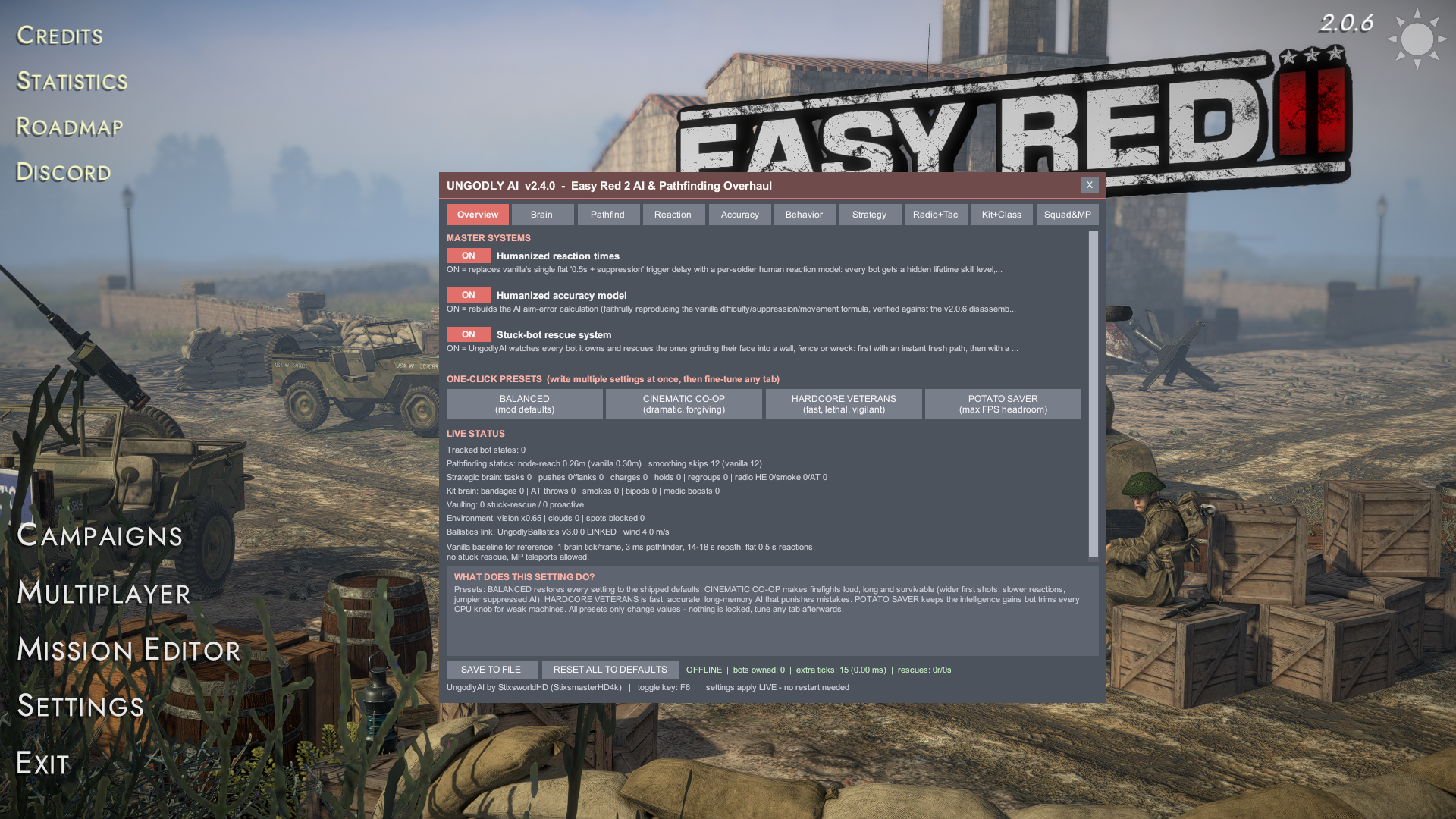
The in-game window (F6, rebindable)
- Ten tabs: Overview / Brain / Pathfind / Reaction / Accuracy / Behavior / Strategy / Radio+Tac / Kit+Class / Squad&MP — grown by a section per update: MAP WEAPONS (v2.5.0) and BATTLEFIELD LOOTING (v2.6.0) on Kit+Class, TAKE COVER & SCREENING (v2.7.0), COUNTERATTACK (v2.9.0) and SMOKE DOCTRINE (v2.11.0) on Strategy, COVER FIGHTING (v2.8.0) on Radio+Tac, CLOSE QUARTERS & MELEE (v2.10.0) on Reaction, AIR COMBAT (v2.12.0) on Behavior, and a whole motorized wing on Squad & MP: ARMOR & TRANSPORT (v2.13.0), COVER & TRANSPORT REFINEMENT (v2.14.0), TANK BATTLES & AIR DEFENSE (v2.15.0), ALL-SYSTEMS REFINEMENT (v2.16.0) and SPAWN LOGISTICS (v2.17.0).
- Hover any control and the bottom panel explains, in gamer terms, exactly
what it changes, what raising vs lowering does, and its allowed range —
202 documented settings across 30 sections, and the
.cfgcarries the same text. - One-click presets on the Overview tab: BALANCED (mod defaults)CINEMATIC CO-OPHARDCORE VETERANSPOTATO SAVER Presets only write values — nothing locks; fine-tune any tab afterwards.
- Everything applies live. SAVE TO FILE writes the cfg; changes take effect either way, no restart needed. Rebind the toggle key from Squad & MP → PRESS TO REBIND…
- Footer telemetry: Offline/Host/Client, bots owned by your PC, extra brain ticks and their real millisecond cost, stuck-rescue counters — plus the Ballistics link status when UngodlyBallistics is present, and live Overview counters accumulated across updates: map-guns cached/manned, looting, cover peek-cycles and snaps, screens thrown, counterattack waves, melee strikes with charging kills broken out, air-combat stats including a dedicated gun-dive counter, armor/transport activity with driver insurance and ambush dismounts, tank halts, flak locks, computed AA leads, interceptor vectors, danger-close vetoes, bandages-in-cover, vault→cover chains, and spawn rides.
Multiplayer — safe by ownership, not by trust
Easy Red 2 simulates each bot on exactly one machine — the Photon owner of that unit (the host for world bots, each player for their own squad). UngodlyAI applies every behavior change only inside the simulation of bots your machine owns, using the game's own ownership gate. Other players simply receive the normal Photon position/state sync they always did.
Consequences: no desync is possible by construction; mixed lobbies work in every combination
(modded host + vanilla clients, vanilla host + modded clients); as a client you enhance your
own squad's bots, as host you enhance all world-spawned bots; and the vanilla online-teleport
cheat is blocked by default (AiTeleportPolicy = BlockInMultiplayer).
One looting footnote (v2.6.0): looting transfers run inside the owner's authoritative simulation like everything else, but the game ships no dedicated corpse-pickup RPC — so a remote client may briefly keep rendering an item that was already taken from a body. Cosmetic only; no gameplay state diverges.
Performance notes
Extra AI thinking is governed by BrainFrameBudgetMs with a hard stop;
the stuck watchdog is time-sliced (default 12 bots/frame); the per-soldier state store is
allocation-free on hot paths. On a weak CPU, open the GUI → Overview →
POTATO SAVER, or lower BrainTicksPerFrame manually —
even a value of 3 is a night-and-day improvement over vanilla.
Disable / uninstall
- Temporary A/B test: set
[1. Master] EnableMod = false(or untick systems in the GUI) — the mod loads but touches nothing. - Full removal: delete
BepInEx\plugins\StixsworldHD.EasyRed2.UngodlyAI.dlland, optionally, the cfg. BepInEx itself is removed by deletingwinhttp.dllfrom the game root.